
Why Add a Logo to Your Gmail Signature?
- Brand Recognition – Your company logo reinforces your brand with every email you send.
- Professionalism – A polished signature builds trust and credibility.
- Consistency – Ensure every team member uses the same branding and format.
Step 1: Open the SyncSignature Email Signature Generator
- Log in to SyncSignature or create an account
- Select a ready-made professional email signature template with a logo or start with.
- Complete the onboarding.
Step 2: Add Your Company Logo
To insert a logo in your Gmail signature via SyncSignature:- Click the image or logo placeholder in the signature editor.
- Upload a PNG or JPG logo, or insert it via a secure hosted image URL.
- Adjust logo size for balance: too big will dominate, too small will get lost.
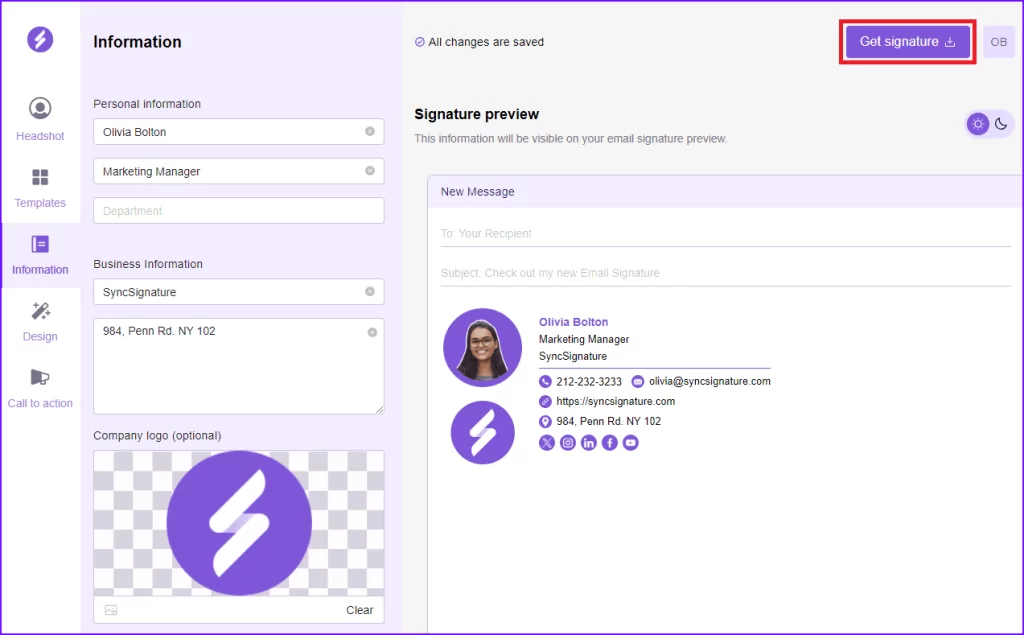
Step 3: Include Contact Details and Links
Add essential information alongside or below your logo:- Full name and job title
- Company name
- Phone number
- Website link
- Email address
- Social media icons (LinkedIn, Instagram, X/Twitter, etc.)
- Call-to-action links like “Book a Meeting” or “View Portfolio”
Step 4: Preview and Customize the Layout from Design section
The real-time preview in SyncSignature lets you adjust:- Alignment and spacing between logo and text
- Font style and size to match your brand
- Colors to reflect your brand palette
Step 5: Assign the Signature Across Google Workspace (optional)
Unlike Gmail’s native signature tool, SyncSignature can apply your email signature with logo across your entire organization automatically. Follow this tutorial for step by step implementation .Step 6: Test Your Logo Email Signature
Send test emails to:- An internal Gmail address (to see how it looks inside your domain)
- An external address (to check formatting in other clients like Outlook or Apple Mail)
- Logo displays correctly on desktop and mobile
- Links work as intended
- Formatting is consistent everywhere
Need Help?
If you’ve followed these steps and still have issues, email us at support@syncsignature.com and we’ll assist you.